
Recommended Mobile Friendly Casinos
As a mobile-first platform, Instaspin stands as the primary choice for players who prefer gaming on the move. We have built our entire system to function fluidly on modern mobile devices, removing the need to search for alternatives. Our web-based Insta spin app delivers the complete casino suite directly to your browser, featuring fast loading times, intuitive navigation, and secure access to your account. You can deposit, play, and withdraw funds with confidence, all from the palm of your hand.









How to Install the Instaspin App
Our application does not require a complicated download from an app store. Instead, you can add a shortcut to our progressive web app directly to your device’s home screen. This method gives you one-tap access just like a traditional application, without using significant storage space. Follow these general steps to set up the Instaspin app on your device.
- Open website
Manage to the Instaspin website using your preferred mobile browser.
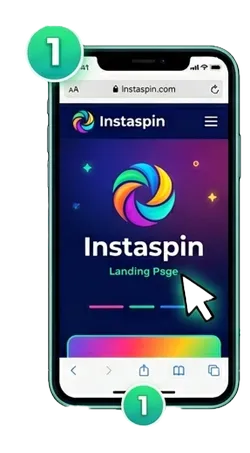
- Open your browser
Open your browser’s menu and look for the “Add to Home Screen” or a similar option.
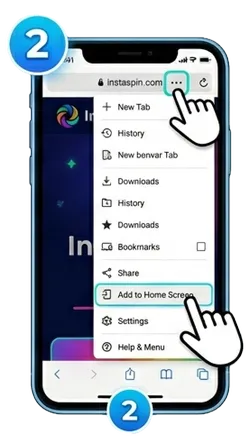
- Create a shortcut
Confirm the action to create a shortcut icon on your device.
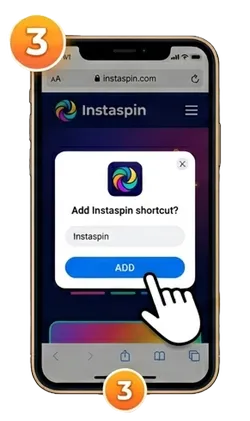
- New icon
Tap the new icon to launch the platform and log in to your account.
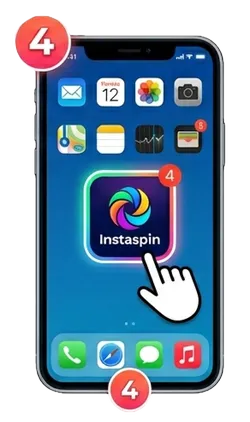
Once completed, you are ready to play. The icon on your home screen will now launch our platform directly, connecting you to your favourite games instantly.
Device System Requirements
Our system has been designed to operate effectively on a variety of contemporary mobile gadgets. It is not necessary to own the latest smartphone to have a good gaming experience. The important considerations are access to the internet and having a new browser installed on your gadget. These are the minimum hardware requirements needed for optimum results.
| Requirement | Recommended Specification |
| Operating System | Android 8.0 (Oreo) or newer / iOS 12.0 or newer |
| Memory (RAM) | 2 GB or more |
| Web Browser | Latest version of Chrome, Safari, or Firefox |
| Internet Connection | Stable Wi-Fi, 4G, or 5G connection |
Even if your device does not meet all the recommended specifications, you can still access our full suite of games through your mobile browser. The Insta spin app is designed to be lightweight and accessible.
Installation Options by Platform
There is a difference in the process of installing our app on your device depending on whether you have an Android device or an iOS one. The procedure is relatively simple and will provide you with access to our lobby immediately after opening the app.
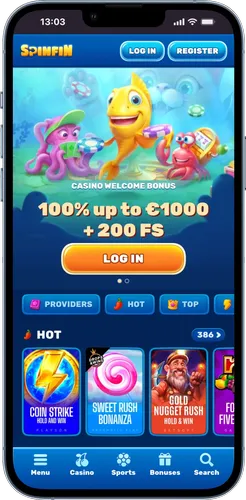
Below, we have provided separate instructions for each operating system. Following these steps will place the Instaspin app icon alongside your other applications, making it easy to find and launch whenever you wish to play.
Android Setup
For Android users, creating a home screen shortcut is done through the Google Chrome browser. This process installs our progressive web app, giving you a dedicated, full-screen gaming portal. The Insta spin app will look and feel like a native application.
- Launch the Chrome browser on your Android device.
- Go to the official Instaspin Casino website.
- Tap the three-dot menu icon in the top-right corner of the browser.
- From the dropdown menu, select the “Add to Home screen” option.
- A prompt will appear where you can name the shortcut. Confirm by tapping “Add”.
The icon will now be visible on your home screen or in your app drawer. Tapping it will open our platform directly, bypassing the need to type the web address each time.
iOS Access
Users with an iPhone or iPad can add our platform to their home screens using the Safari browser. This action creates a web bookmark that functions just like a standalone application, proposal quick and easy access to our complete game selection.
- Open the Safari browser on your iOS device.
- Manage to the platform homepage.
- Tap the “Share” icon at the bottom of the screen (it looks like a square with an arrow pointing up).
- Scroll through the options and tap on “Add to Home Screen”.
- You can edit the name for the icon before tapping “Add” in the top-right corner to finalise.
You will now find the Instaspin app icon on your device’s home screen, ready to launch with a single tap for your next gaming session.